هیچ محصولی در سبد خرید نیست.
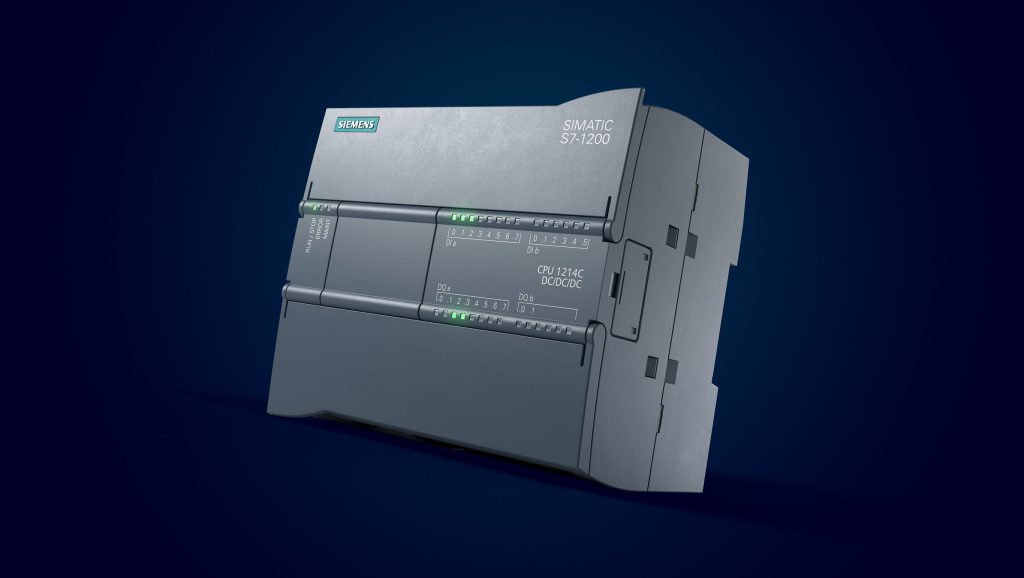
In a world where millions of digital and analog pulses flow through factories every second, Programmable Logic Controllers (PLCs) serve as the beating heart of automation systems. The Siemens S7-1200 series, launched in 2010 as a compact and intelligent revolution, was precisely designed to meet the needs of small to medium-sized industries: an integrated CPU with built-in I/Os, sufficient memory for thousands of lines of code, native PROFINET networking, and TIA Portal software, which turns programming into a graphical and intuitive experience. This introductory training course is a gateway to the world of modern automation—a world where complex MPI cables and outdated software are no longer needed, and everything is managed within a unified, fast, and secure environment.
سرفصل ها
ToggleWhy the S7-1200? The answer is simple: Simplicity + Power + Foresight. In Iran, where over 80% of small to medium-sized automation projects (such as food packaging lines, smart irrigation systems, CNC machinery, and pump station controls) seek cost-effective and scalable solutions, the S7-1200 has rapidly replaced older models like the S7-200 and even some S7-300 applications. Siemens statistics show that over 2 million S7-1200 units have been installed worldwide, with this number increasing by 25% annually in the Middle East. This course, while focusing on foundational principles with an eye toward the future, will transform you from a beginner into a skilled entry-level programmer capable of implementing a complete control system from start to finish.
The introductory PLC S7-1200 training course is designed to start from absolute zero and, through small yet firm steps, bring you to a level where you can execute real-world industrial projects. This structure is inspired by the real-world experiences of technicians who often face challenges such as incorrect IP configuration, faulty addressing, or a lack of understanding of the differences between TIA Portal and Simatic Manager. In the following sections, we will examine each topic in detail so you can see how this course builds a solid foundation for advanced courses and even transitioning to the S7-1500.
The course begins with an introduction to Siemens S7 series PLCs. A brief history of PLC evolution is presented here: from the S5 to the S7-200, S7-300, and finally the S7-1200 as the “next-generation PLC.” Key features such as CPUs 1211C to 1217C, built-in I/Os (up to 14 DI/10 DO), and the ability to add up to 8 signal boards are reviewed. Real-world example: controlling a small elevator using only a CPU 1212C – with no need for a rack or separate modules.
Introducing TIA Portal software and examining its differences from Simatic Manager is a turning point in the course. TIA Portal (Totally Integrated Automation) is an integrated environment that combines programming, HMI, drive, and safety systems on a single platform. Key differences include modern graphics, drag-and-drop functionality, ready-made libraries, and the elimination of separate HW Config. A practical example: creating a project in TIA Portal in under 2 minutes, compared to 10 minutes in Simatic Manager.
The hardware section covers the structure of the S7-1200 PLC, its relevant modules, and the description of the LEDs on the PLC. The compact CPUs, Signal Modules (SMs), Signal Boards (SBs), and the intelligent LEDs are reviewed: RUN/STOP (green/red), ERROR (flashing red), MAINT (yellow for maintenance), and LINK (for network status). At a glance, you can diagnose the system’s condition—for example, a yellow MAINT LED indicates the battery needs to be replaced.
Wiring the input and output cards and connecting various sensors to the PLC is the most practical part. Wiring for 24V DC, transistor/relay outputs, and connecting NPN/PNP sensors, proximity switches, and push buttons with standard diagrams are taught. Safety techniques such as using fuses, noise isolation, and proper grounding are reviewed. Example: connecting a photoelectric sensor to digital input I0.0 and activating a lamp on output Q0.0.
Hardware configuration in the TIA Portal software and card settings are performed in the Device Configuration environment. You add modules to virtual slots, set addresses, and define parameters such as input filters (0.1 to 100 milliseconds). Common errors like “Module not compatible” are resolved with practical solutions.
The concept of an IP Address and its use in network communication introduces you to the world of networking. Configuring static/dynamic IP, Subnet Mask, Gateway, and pinging the PLC from a computer are taught. Example: connecting the PLC to an HMI via PROFINET using IP 192.168.0.1.
Uploading and downloading programs, along with password protection, emphasize security. Using Online & Diagnostics, you download the program, and with Know-how Protection, you control access levels (Read/Write/Full).
Using simulators like PLCSIM and PLCSIM Advanced for program testing allows you to evaluate your program without actual hardware. Example: simulating 10 digital inputs and monitoring the outputs in the Watch Table.
An introduction to programming languages (SCL, LAD, FBD) demonstrates versatility. LAD is used for visual logic, FBD for electrical engineers, and SCL for software programmers. A comparative example: an AND function in all three languages.
The memory areas in the S7-1200 PLC include I, Q, M, DB, and Temp. Memory management to prevent overflow is taught.
Addressing of inputs, outputs, and memory areas using the formats %I0.0, %Q0.0, and %M10.0 is taught.
Defining tags—PLC Tags, Watch Table, Symbol Table, Force Table, etc.—enhances program organization. Tags provide meaningful naming (e.g., Motor_Start instead of I0.1), and the Watch Table is used for online monitoring.
Digital programming and reviewing its related instructions through numerous examples form the core of the course. Instructions such as SR, RS, AND, OR, and NOT are covered with examples like escalator control, traffic lights, and safety interlocks.
Timers, counters, comparators, converters, and computational and data transfer instructions—including TON/TOF/TP, CTU/CTD, CMP (==, >, <), ADD/SUB/MUL/DIV, MOVE—are covered.
Creating a data block and using it in the program to store constant/variable data is covered. Example: DB1 for machine settings.
Structured programming using FC and FB teaches modularity. FCs are used for general functions, while FBs are for functions with memory (Instance DB).
Introduction to instrumentation covers the fundamentals of sensors, transducers, and actuators.

