هیچ محصولی در سبد خرید نیست.
In today’s world, where industry and technology are advancing at a remarkable pace, industrial automation is recognized as one of the main pillars of economic development and increased productivity. Programmable Logic Controllers (PLCs) play a central role in this field. Initially designed in the 1960s to replace mechanical relays in automotive production lines, these devices have become essential tools in various industries, including oil and gas, automotive, pharmaceuticals, food production, and even smart building systems.
سرفصل ها
ToggleSiemens, as a pioneer in this technology, introduced the S7 series, with the S7-300 model being one of the most versatile and widely used members of this family. This introductory training course, focusing on the PLC S7-300, serves as a bridge between theoretical knowledge and practical skills, aiming to equip engineers, technicians, and students with the tools needed to enter the world of automation.
The importance of learning PLC in the digital age has become more evident than ever. With the advent of Industry 4.0, the Internet of Things (IoT), and artificial intelligence, programmable logic controllers are now used not only for controlling simple processes but also for integrating with complex networks, analyzing real-time data, and predicting failures. In Iran, where heavy industries such as petrochemicals, steel, and mining play a key role in the economy, mastering Siemens technologies can create abundant job opportunities.
Statistics show that over 70% of industrial automation systems worldwide use European brands like Siemens, and the S7-300 series, due to its high reliability, modularity, and extensive software support, has been widely adopted in many domestic and international projects. This course not only helps you familiarize yourself with the fundamental principles but also lays a solid foundation for more advanced courses such as S7-1200, S7-1500, or even SCADA systems.
The PLC S7-300 training course ( introductory ) is designed to start from the ground up and gradually progress to more complex concepts. This step-by-step structure is inspired by the real-world experiences of industrial engineers who often face challenges such as incorrect wiring, faulty hardware configuration, or inefficient programming. In the following sections, we will examine the course topics in detail so you can understand how each part contributes to building a well-rounded professional.
First, the course begins with an introduction to Siemens’ S7 series PLCs. Here, a brief history of PLC evolution is presented: from early models like the S5 to the modern S7 series. The main focus is on the unique features of the S7-300, such as its high memory capacity (up to 8 MB), fast processing speed (up to 0.1 milliseconds per instruction), and the ability to expand up to 32 modules. Real-world application examples, such as controlling production lines in cement factories or ventilation systems in hospitals, demonstrate how these PLCs ensure process stability.
Next, the introduction to SIMATIC Manager software begins. This software, now integrated with TIA Portal but still essential for the S7-300, provides a unified environment for programming, debugging, and monitoring. In this section, the user interface, navigation tools, and basic tips, such as creating a new project, are taught. Imagine a novice engineer who, without knowledge of this software, wastes hours trying to locate a memory block—this section addresses such issues.
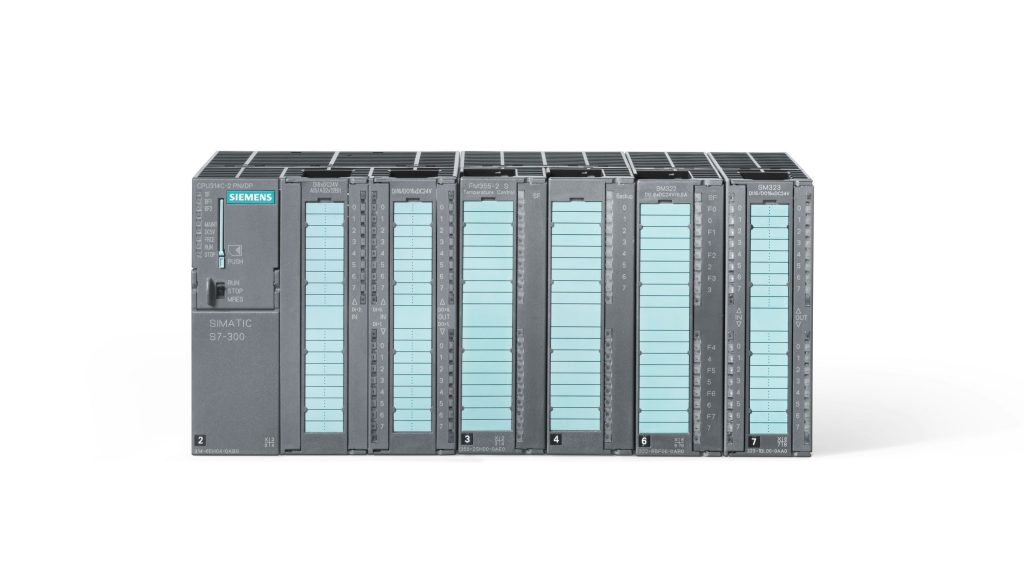
The structure of the S7-300 PLC, its modules, and the description of the LEDs on the PLC form the key hardware section. The S7-300 PLC consists of CPUs such as the 313C or 315-2DP, combined with input/output (I/O) modules, communication (CP) modules, and power supply (PS) modules. LEDs play a vital role in troubleshooting: SF for system faults, BF for bus faults, FRCE for forcing, and RUN/STOP for operational status. Through visual examples, you will learn how to identify issues at a glance—for instance, a red SF LED indicates a battery or memory failure.
Wiring input and output cards and connecting various sensors to the PLC is the most practical section. Digital wiring (24V DC) and analog wiring (4-20 mA) are examined according to IEC safety standards. Connecting sensors such as Proximity, Thermocouple, or Pressure Transmitters is taught using precise diagrams. A real-world example: in a pump control system, incorrect wiring can lead to motor damage; here, grounding and shielding techniques to reduce noise are learned.
Hardware configuration in SIMATIC Manager software and card settings are the continuation of the hardware section. In HW Config, you drag-and-drop modules and adjust parameters such as noise filters or signal ranges. This section resolves common errors, such as address mismatches, through realistic simulation.
Introduction to methods of connecting a PC to a PLC (with reference to the S7-1200 for comparison) covers communication. Protocols such as MPI, PROFIBUS, PROFINET, and Ethernet are examined. A comparison with the S7-1200 demonstrates how the S7-300 is better suited for larger systems, while the 1200 is optimized for smaller applications. Tools like PG/PC Interface are taught.
Uploading and downloading programs, along with password protection, emphasize security. Using Online Functions, you download the program and control access levels with passwords (Level 1 to 3). Example: protecting intellectual property in an industrial project.
Using a simulator to test programs without actual hardware introduces PLCSIM. Testing programs in a virtual environment reduces time and costs.
Introduction to various programming languages (SCL, LAD, FBD) demonstrates diversity. LAD is for ladder logic, FBD for function blocks, and SCL for structured code similar to C. Comparative examples help you choose the appropriate language.
Memory areas in the S7-300 PLC include I, Q, M, DB, L, and others. Memory management is essential for program optimization.
Addressing of inputs, outputs, and memory areas is taught in binary/decimal formats, such as I0.0 for an input bit.
Defining tags, symbol tables, VAT ,… improves program organization. VAT is used for online variable monitoring.
Digital programming and reviewing its related instructions through numerous examples form the core of programming. Instructions such as SET/RESET, AND/OR are covered with examples like conveyor belt control.
Timers, counters, comparators, converters, and computational/data transfer and… advanced blocks: TON/TOF, CTU/CTD, CMP, ADD/MUL, MOVE.
Creating data blocks and using them in the program, along with an introduction to UDT for structured data. UDT defines user data types.
Structured programming using FC and FB teaches modularity. FCs are memory-less, while FBs use instance DB.
Introduction to instrumentation covers the fundamentals of sensors and actuators.
Processing analog signals examines normalization scaling, and handling 4-20mA signals.
This course, through a combination of theory, practical examples, and final projects, will bring you to a level where you can design a complete control system. If you are ready to build your industrial future, this course is the best start.

